What is Meowdoku?
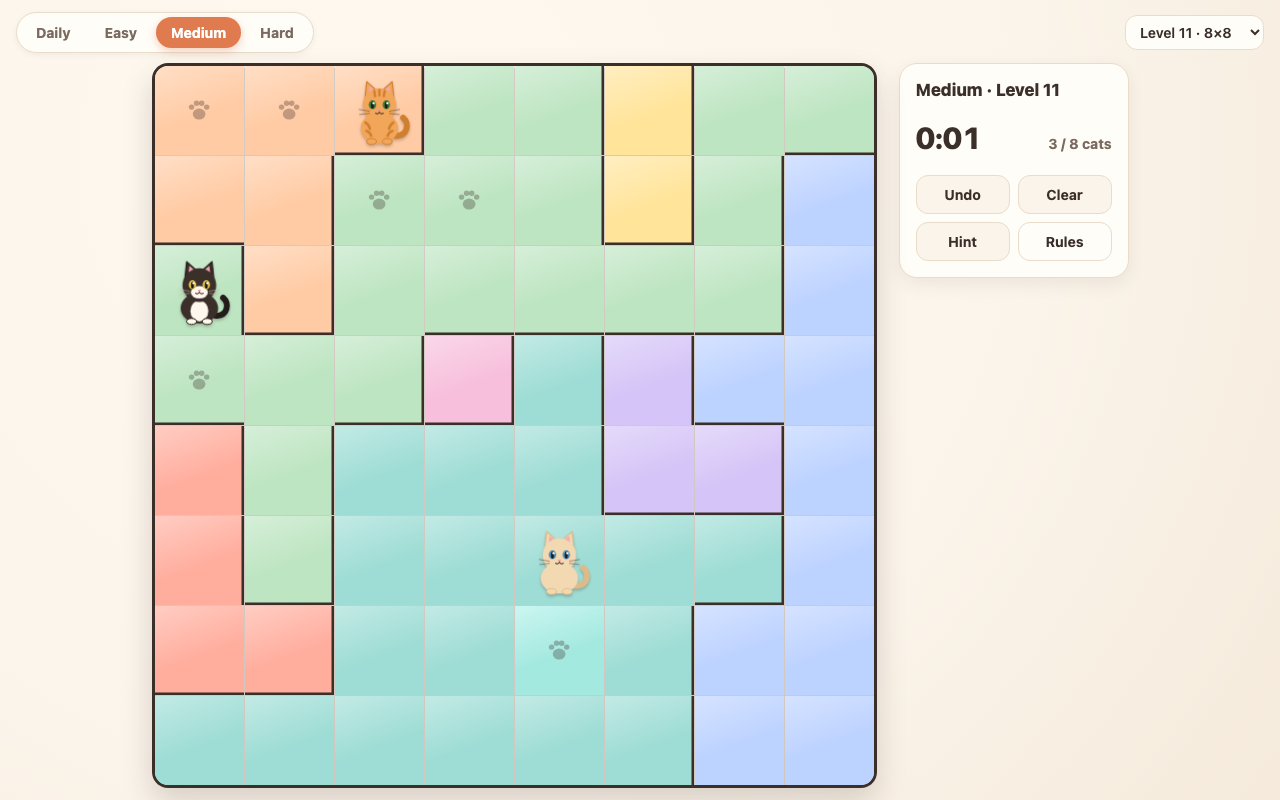
Meowdoku is a logic puzzle where you place cats on a grid split into colour regions. Every row, every column and every colour region needs exactly one cat, and no two cats may touch, not even at a corner. It mixes the placement rules of Sudoku with the careful deduction of Minesweeper, and every Meowdoku board on this site has exactly one correct answer, so you can always solve it with logic instead of guessing.
This page is a free web version of Meowdoku. It runs in your browser on a computer, phone or tablet, with no download and no account. There is a new daily Meowdoku board every day and 90 levels in three difficulty packs.
How to Play Meowdoku
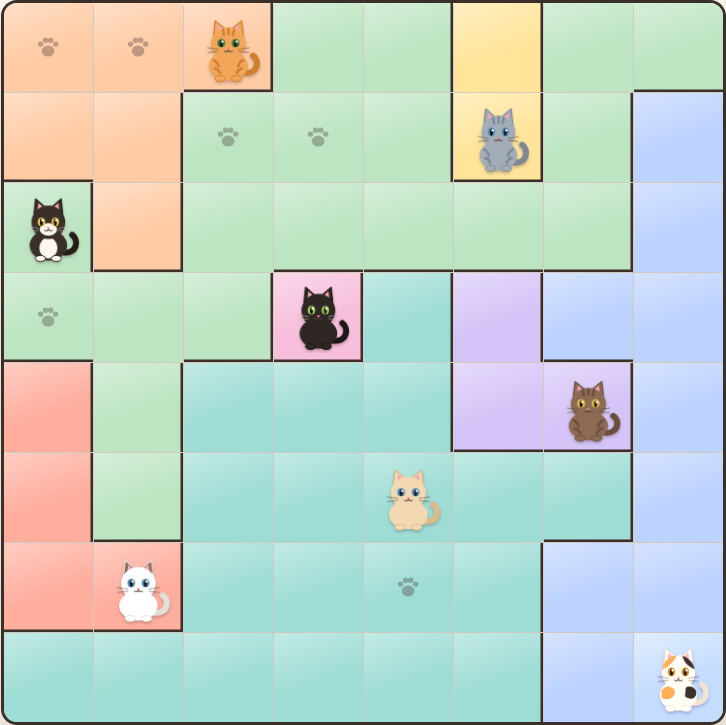
The goal of Meowdoku is to fill the board with cats so that all four rules hold at the same time:
- One cat per row. Each horizontal row holds exactly one cat.
- One cat per column. Each vertical column holds exactly one cat.
- One cat per colour region. Each coloured area holds exactly one cat. An 8×8 board has 8 regions and 8 cats.
- Cats never touch. No two cats can sit next to each other, including diagonally.
Controls
- Tap or click a cell once to mark it with an X, meaning "no cat here".
- Tap the same cell again to place a cat.
- Tap a third time to clear the cell.
- Drag across empty cells to mark several X at once, which saves a lot of taps on big boards.
- Undo steps back one move, Clear empties the board, and Hint either removes a cat that is in the wrong place or reveals one correct cat.
In Meowdoku, cats that break a rule turn red right away, so you see a mistake the moment you make it. When the last cat lands in the right spot, the timer stops and your time is saved.
Meowdoku Rules at a Glance
| Rule | What it means |
|---|---|
| Rows | Exactly one cat in every row |
| Columns | Exactly one cat in every column |
| Regions | Exactly one cat in every colour region |
| Spacing | Cats never touch, diagonals included |
| Solutions | Every board has one unique solution |
Daily Meowdoku and Level Packs
Daily Meowdoku. A fresh board unlocks every day at 00:00 UTC. Weekday dailies are 8×8, Saturday is 9×9 and Sunday is 10×10. Everyone gets the same daily board, and when you solve it without hints your time goes onto that day's leaderboard of fastest solvers.
Level packs. Pick a pack from the tabs above the board:
- Easy: 30 levels on 5×5 and 6×6 boards, good for learning the rules.
- Medium: 30 levels on 7×7 and 8×8 boards.
- Hard: 30 levels on 9×9 and 10×10 boards, where most regions only reveal themselves after several steps of reasoning.
Your solved levels and best times are saved in this browser, so you can close the tab and continue later. The level menu marks every Meowdoku level you have already solved together with your best time.
Meowdoku Tips and Strategies
These techniques solve every Meowdoku board on this site without guessing. Most Meowdoku players learn them in roughly this order.
Start with the smallest regions
A region of one or two cells leaves almost no choice. If a region is a single cell, the cat goes there. If it is two cells side by side, one of them holds the cat, so every cell touching both of them can be crossed out.
Cross out around every cat
The moment you place a cat, mark X on its whole row, its whole column and all eight cells around it. Doing this every time is the habit that makes Meowdoku fast, and it keeps the board readable.
A region inside one row claims that row
If all the open cells of a colour region sit in one row, that region's cat must be in that row. Every other cell in that row, outside the region, can be crossed out. The same works for columns.
Count regions against rows
If two regions fit entirely inside the same two rows, those two rows belong to them. Every other cell in those two rows is empty. On a 10×10 Meowdoku board this pattern, extended to three rows and three regions, often breaks the puzzle open.
Use the 2×2 rule
Any 2×2 square can hold at most one cat, because all four cells touch each other. When a region fits inside a 2×2 square, its cat sits somewhere in that square, so the cells around the square that touch all of its cells can be crossed out.
Check what a cat would block
When you are stuck between two cells, imagine a cat in one of them and look at what it crosses out. If it would leave some region or row with no space at all, that cell is wrong and the cat goes in the other one.
Meowdoku vs Sudoku, Minesweeper and Star Battle
Meowdoku borrows from several classic puzzles. Like Sudoku, every row and column needs exactly one of something. Like Minesweeper, you spend most of the game proving where things cannot be. The closest relative is the Star Battle family of grid puzzles with one star per row, column and region. Meowdoku keeps those rules, adds the no-touching rule, swaps stars for cats and puts it all on calm, colourful boards.
Meowdoku FAQ
Is Meowdoku free?
Yes. Every daily Meowdoku board and all 90 levels are free to play on this site.
Do I need to download anything?
No. Meowdoku runs directly in your web browser on Windows, Mac, Linux, Android and iPhone. There is nothing to install and no sign-up.
Can I play Meowdoku on my phone?
Yes. The board resizes for phones and tablets, and you play by tapping. Use the Fullscreen button under the game for a bigger Meowdoku board.
Does every Meowdoku puzzle have a unique solution?
Yes. Each board was checked by a solver to have exactly one solution, so pure logic is always enough.
Is my progress saved?
Yes. Solved levels and best times are stored for this browser. Clearing your browser data removes them.
When does the daily Meowdoku change?
A new daily board unlocks every day at 00:00 UTC.
What happens if I use a hint?
A Meowdoku hint fixes one wrong cat or reveals one correct cat. You can still finish the board, but a daily time that used hints is not added to the leaderboard.
Is this the official Meowdoku app?
No. This is an independent, free browser version of the Meowdoku puzzle with its own boards. It is not affiliated with the developers of the Meowdoku mobile app.
The game does not load. What can I do?
Refresh the page and press Play again. If it still does not load, try another browser or turn off extensions that block scripts, then let us know through the contact page.
Comments